Prospección en LinkedInSeñales de NegocioInteligencia ArtificialGeneración de Leads
LinkedIn Signals: Turn Interactions into Business Opportunities with Turbo Tangerine
What if your next clients are already sending you signals? LinkedIn comments, interactions with competitors, recruitments, job changes… With its new LinkedIn Signals feature, Turbo Tangerine detects business opportunities, qualifies leads using AI, and helps you reach out at the right time with personalized messages.
LinkedIn Signals: Turn Interactions into Business Opportunities with Turbo Tangerine
Discover how to detect prospects at the right time, identify purchasing signals, and automate the search for qualified leads through artificial intelligence.
Business prospecting on LinkedIn still often relies on the same method: searching profiles, sending invitations, multiplying messages, and hoping to get a response.
Yet, your future clients already give clues about their needs, interests, and projects.
They comment on posts, interact with your competitors, recruit new employees, or change positions.
These interactions constitute what are called business signals.
The problem? Detecting them manually takes time. And when you discover them, sometimes it is already too late to start the conversation.
With its new LinkedIn Signals feature, Turbo Tangerine helps you identify these opportunities, qualify prospects with artificial intelligence, and choose the best business action.
The goal is simple: to move from cold prospecting to smarter, contextualized, and more relevant prospecting.
What is a business signal on LinkedIn?
A business signal is an event or interaction that can reveal an opportunity to make contact.
Unlike a simple list of prospects, signals help understand why a person might be interesting for your business, and especially why it would be the right time to contact them.
Let’s look at some examples:
An executive comments on a post relating to an issue that your service solves.
A prospect starts following your LinkedIn profile.
A company recruits a specialist in a field related to your offer.
A decision-maker regularly interacts with a competitor’s posts.
A former contact changes position and takes on new responsibilities.
None of these events necessarily indicate an intention to purchase.
However, they provide context to your prospecting and allow you to prioritize contacts who truly deserve your attention.
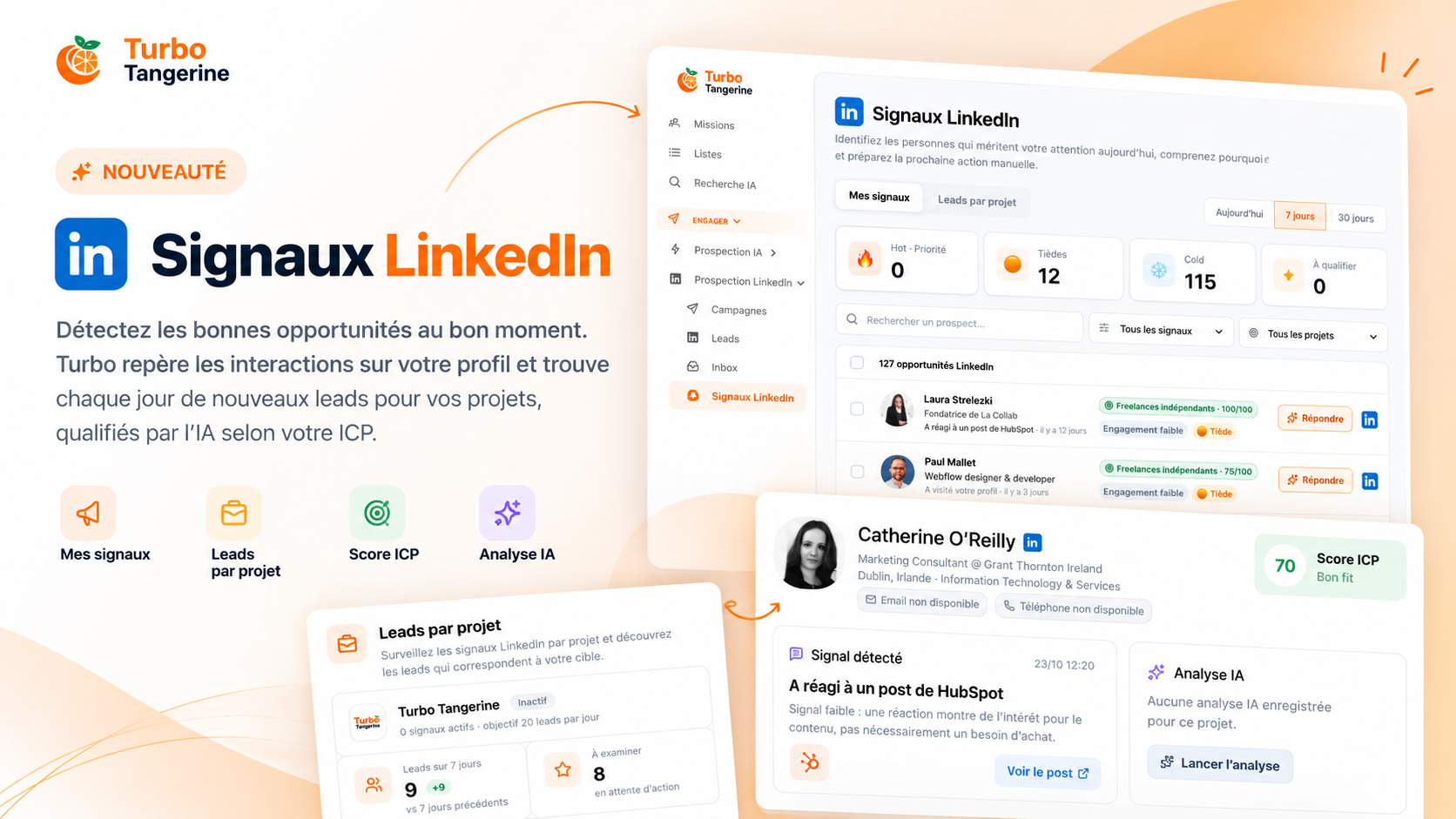
This is exactly what Turbo Tangerine offers with two complementary features: My Signals and Leads by Project.
1. My Signals: identify people interested in you
Your LinkedIn profile potentially generates business opportunities every day.
Someone likes your post, another leaves a comment, a professional starts following you.
Usually, these interactions get lost in LinkedIn notifications.
With My Signals, Turbo Tangerine centralizes them in a dedicated space to help you identify people likely to become prospects.
What signals are detected?
Turbo Tangerine monitors several types of interactions:
Likes on your LinkedIn posts.
Comments left on your posts.
New followers of your profile.
Profile visits, when your LinkedIn subscription allows access to that information.
Reactions and comments on posts from competitor pages you are monitoring.
The detection runs regularly to display new interactions.
Each identified person joins a prospect pool separate from your CRM.
You stay in control: no prospect is automatically added to your CRM.
Interactions turned into qualified opportunities
Detecting an interaction is not enough.
A comment from a student, a competitor, or a sales director does not necessarily represent the same opportunity for your company.
Turbo Tangerine therefore evaluates each profile based on your targeting criteria.
This is where the ICP score comes into play.
2. ICP Score: identify prospects who truly match your target
The ICP, or Ideal Customer Profile, represents the ideal client profile for your business.
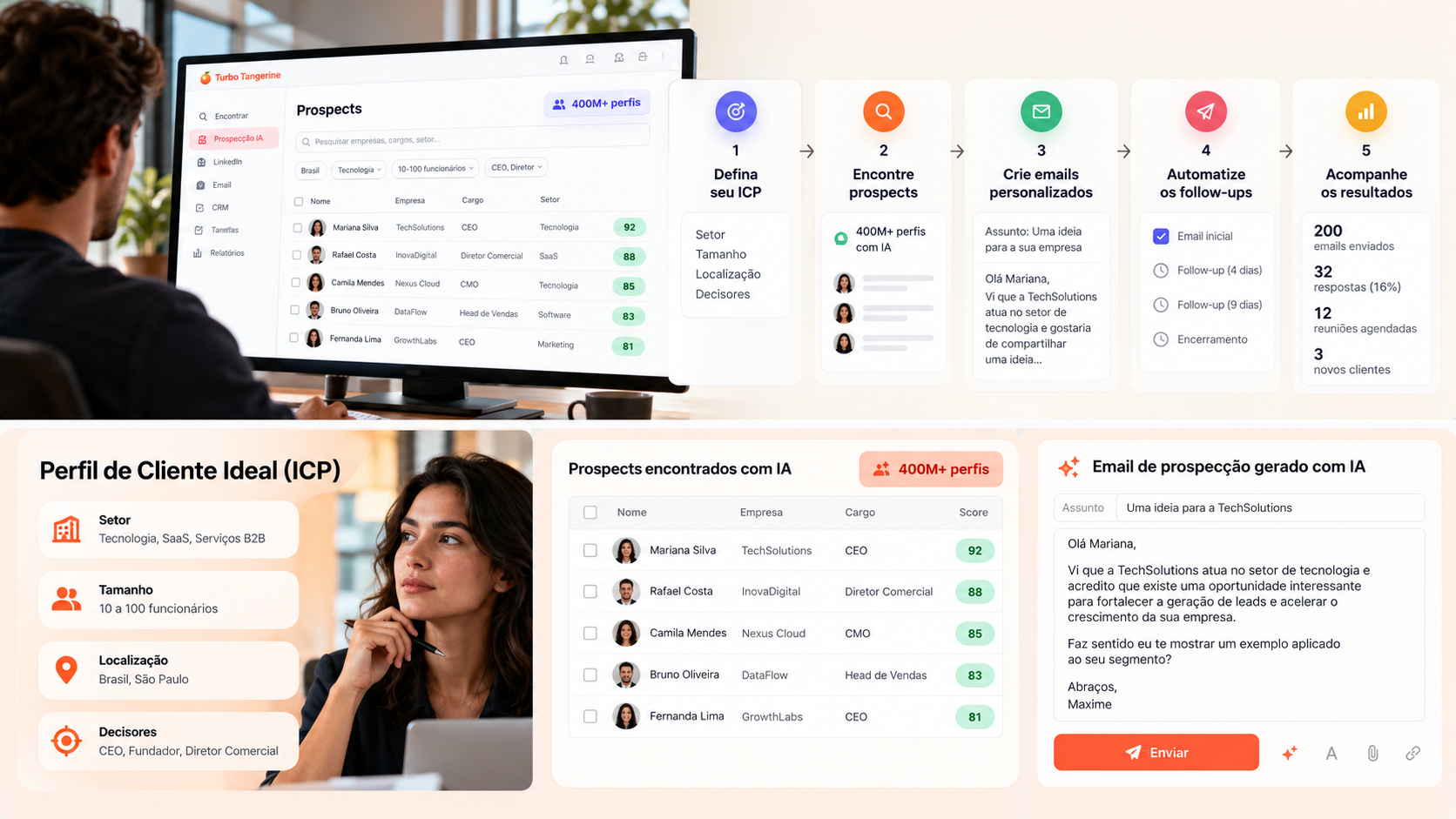
In Turbo Tangerine, you can define your targeting criteria according to your projects:
The position or role held.
The industry sector.
The company size.
The country or geographical area.
Other characteristics relevant to your offer.
Each prospect receives an ICP score from 0 to 100, calculated according to their fit with your criteria.
For example, a small business leader who exactly matches your target may get a score of 90/100, while a less relevant profile will receive a lower score.
This qualification allows you to focus your efforts on the people with the best potential.
And since each ICP is associated with one or more projects, the same prospect can be relevant for one offer and much less for another.
3. Hot, Warm, Cold: understand the temperature of each prospect
A good ICP score does not mean that a prospect is ready to buy.
A person may be a perfect fit for your target without showing any immediate need.
Turbo Tangerine therefore distinguishes profile fit from level of commercial interest.
Prospects are classified into four categories:
Temperature
Meaning
🔥 Hot
Prospect matching your target and having expressed an explicit commercial intent in a comment.
🟠 Warm
Relevant profile who has shown interest, without clearly established intent to purchase.
❄️ Cold
Low interaction or prospect considered uninteresting.
⭐ To qualify
Insufficient information to properly assess the opportunity.
You can also assign a personal rating from 1 to 5 stars and add your own comments.
This evaluation can change the commercial temperature of the prospect without altering their ICP score.
Thus, you keep both an objective and commercial view of each opportunity.
4. Leads by project: automatically find new prospects
With My signals, Turbo Tangerine identifies people who interact with you or with the monitored competitor pages.
But how to discover new opportunities with people who don’t yet know your company?
This is the role of Leads by project.
This second feature monitors relevant commercial events based on your activity, offers, and target.
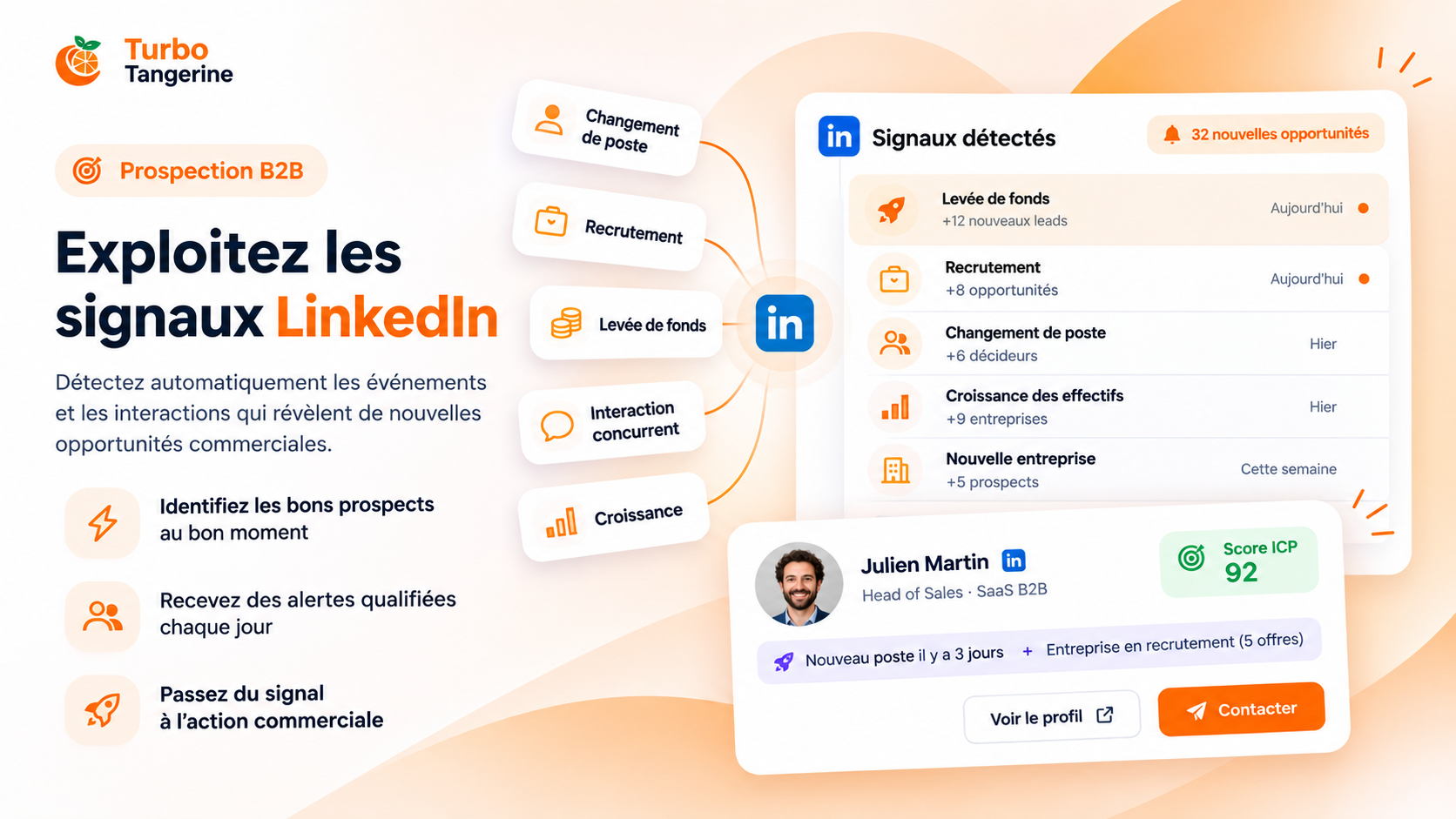
Six types of signals to discover opportunities
1. Interactions with your competitors
Identify people who react or comment on LinkedIn pages of your competitors.
They potentially are interested in topics directly related to your offer.
2. Monitoring of pages and people
Follow selected LinkedIn pages or profiles and use keywords to spot relevant posts.
3. Companies that are hiring
A company hiring may be in a phase of growth, transformation, or structuring.
Turbo Tangerine searches job offers matching profiles associated with your activity.
4. Public contracts
For companies selling to French public organizations, Turbo Tangerine can use contract awards published in the BOAMP.
5. New job offers from targeted companies
Monitor specific companies to identify their new recruitment needs.
6. Position changes in your CRM
An old contact who becomes director, joins a new company, or takes on more responsibilities can represent a new opportunity.
AI-recommended signals according to your project
You don’t need to decide alone which sources to monitor.
Turbo Tangerine uses your project information to suggest suitable signals:
Your ICP and personas.
Your commercial offer.
Your knowledge base.
Your competitors.
The information in your CRM.
The AI can also suggest companies, LinkedIn pages, and monitoring criteria.
You then choose the signals to activate and the parameters to use.
Each project has its own collection system and a configurable daily leads objective.
Searches are run daily, with a summary sent by email.
5. An AI analysis to understand each opportunity
Finding a prospect is one thing. Knowing how to approach them is another.
With Turbo Tangerine, each prospect record gathers the information necessary for making a commercial decision.
You will find notably:
Their identity, position, and company.
Their professional background and skills.
Their ICP score and temperature.
The detected commercial signals.
The content of the publication that originated the signal.
The LinkedIn relationship with you.
The history of your available LinkedIn conversations.
Their contact details when accessible or found thanks to enrichment.
You can then launch a contextualized AI analysis.
The artificial intelligence examines the prospect's profile, their interactions, your offer, and the information specific to the project.
It helps you understand the commercial relevance of the contact, the observed signs of interest, any missing information, and the next action to consider.
Rather than contacting each person in the same way, you have an analysis adapted to your commercial context.
6. Personalized emails and LinkedIn messages thanks to AI
Prospecting often fails from the very first message.
Generic approaches, artificial compliments, and copy-pasted commercial proposals are unlikely to interest already highly solicited prospects.
Turbo Tangerine integrates an AI writing engine designed to produce contextualized commercial messages.
Before writing, the AI chooses a relevant commercial angle based on the available information.
It can notably take into account:
The product or service you offer.
The needs of your target.
Your personas and your knowledge base.
Your commercial strategy derived from Strat Machine, when available.
The detected signal.
Information about the company.
Previous LinkedIn exchanges.
The goal is not simply to personalize a first name or a job title.
It is about formulating a contact approach that makes sense for the prospect.
For example, a message will not claim that a person is looking for your solution just because they liked a publication.
The AI instead seeks to use the available context without inventing commercial intent.
You can prepare a LinkedIn invitation, a direct message, or a personalized email.
The proposals remain editable and sending always requires your confirmation.
7. From detection to CRM: manage all your prospecting in one place
One of the main advantages of LinkedIn Signals is its integration with other Turbo Tangerine features.
From a prospect’s record, you can notably:
Send a LinkedIn invitation.
Contact a first-level prospect by LinkedIn message.
Search for their email address or phone number.
Prepare and send an email.
Add the prospect to a CRM list.
Integrate them into a LinkedIn campaign.
Create a follow-up task once the contact is recorded in the CRM.
Mark the opportunity as reviewed or ignored.
This way, you avoid constantly juggling between LinkedIn, your prospecting files, your CRM, and your writing tools.
The process becomes more coherent: detect, qualify, understand, contact, and follow up.
8. A concrete example: finding clients for a web agency
Imagine that you run an agency specialized in website creation and conversion improvement.
You create a project in Turbo Tangerine with an ICP targeting SME executives and marketing managers.
You then activate several signals:
Companies recruiting marketing or e-commerce managers.
Interactions with competitors’ publications.
Monitoring certain companies and their job offers.
Every day, Turbo Tangerine searches for new opportunities based on these parameters.
A company recruits an e-commerce manager.
This recruitment obviously does not guarantee they want to redo their website. But it may be an indication of developing their digital activity.
You consult the record of the company and the detected prospect, check their ICP score, and launch an AI analysis.
If the opportunity seems relevant, Turbo Tangerine can help you write an introductory email tailored to your offer.
You then decide whether to send it or not.
The difference with traditional prospecting?
You no longer start only from a list of names. You start from a concrete event that provides context to your approach.
9. Why adopt signal-based prospecting?
Traditional prospecting mainly consists of identifying a target, then trying to get in touch with them.
Signal-based prospecting adds an essential dimension: context.
It offers several advantages.
Better prioritization
You spend more time on prospects that match your target and present relevant events.
More personalized approaches
Your messages can rely on concrete information rather than generic formulas.
More regular detection
You reduce the manual work needed to monitor interactions and business events.
Prospecting organized by project
Each offer can have its own criteria, signals, prospects, and analyses.
Better sales follow-up
Interesting opportunities can be added to your CRM and campaigns without multiplying tools.
It is not about guaranteeing that a signal will lead to a sale.
It is about giving you the means to identify relevant opportunities to start a conversation more effectively.
10. How to start with LinkedIn Signals?
The feature is accessible from the LinkedIn Prospecting section of Turbo Tangerine.
To get started:
Open LinkedIn Signals, then check the My Signals tab to find detected interactions.
Verify the identified profiles, their ICP score, and their sales temperature.
Go to Leads by project and select your project.
Check signal recommendations, configure sources to monitor, and activate those that interest you.
Set your daily lead goal according to your budget.
Analyze the detected prospects and prepare your contacts with AI.
All from a single platform, with interactions detected regularly and new lead searches by project every day.
Conclusion: prospect less randomly, engage the right conversations
The real challenge of commercial prospecting is not finding thousands of LinkedIn profiles.
It is knowing who to contact, why, and when.
With LinkedIn Signals, Turbo Tangerine combines interaction detection, monitoring of business events, ICP scoring, AI analysis, and the preparation of personalized messages.
You thus have a more structured approach to transform available LinkedIn information into business opportunities.
And above all, you keep control over decisions: which prospects to qualify, who to contact, and when to take action.
Ready to turn LinkedIn signals into business opportunities?
Discover LinkedIn Signals in Turbo Tangerine and start identifying your next prospects.